Meeting Minutes Template: 3 Formats to Copy, With Example
Copy-ready meeting minutes templates for formal, weekly team and client meetings, a filled example, and the format mistakes that make minutes hard to use.
A good meeting minutes template saves you from staring at a blank page, and it makes every set of minutes look the same, so readers always know where to find the decisions. Below you will find three templates you can copy straight into Word or Google Docs, a filled example, and the format mistakes that make minutes hard to use.
In short:
- Every template has three layers: the header (which meeting, when, who), the content (agenda items, decisions, action items) and the sign-off (who wrote it, who approved it).
- Use the formal template for boards, committees and associations, the team template for weekly meetings, and the client template when people from outside your organisation are in the room.
- Keep the order the same every time. Consistency matters more than which template you pick.
What every meeting minutes template needs
Whatever the meeting, the same building blocks come back. This table shows what goes into each part and why it is worth the space.
| Part | What goes in it | Why it matters |
|---|---|---|
| Header | Organisation, meeting name, number if it is a series, date, start and end time, place or call link | Makes the record easy to find and quote later |
| Attendance | Present, apologies, absent, guests; who chaired and who took the minutes | Shows who heard what and whether the meeting could decide |
| Agenda items | One heading per item, in the order of the agenda | Readers jump straight to what concerns them |
| Discussion | The main points and options considered, kept short | Gives context to the decisions without becoming a transcript |
| Decisions | The wording as agreed, plus the vote result if there was one | This is the part people will quote months later |
| Action items | Task, owner, due date, status | Turns talk into work someone is responsible for |
| Closing | Next meeting date, time the meeting ended | Closes the loop and sets the next date |
| Sign-off | Prepared by, approved by, date of approval | Separates a draft from the official record |
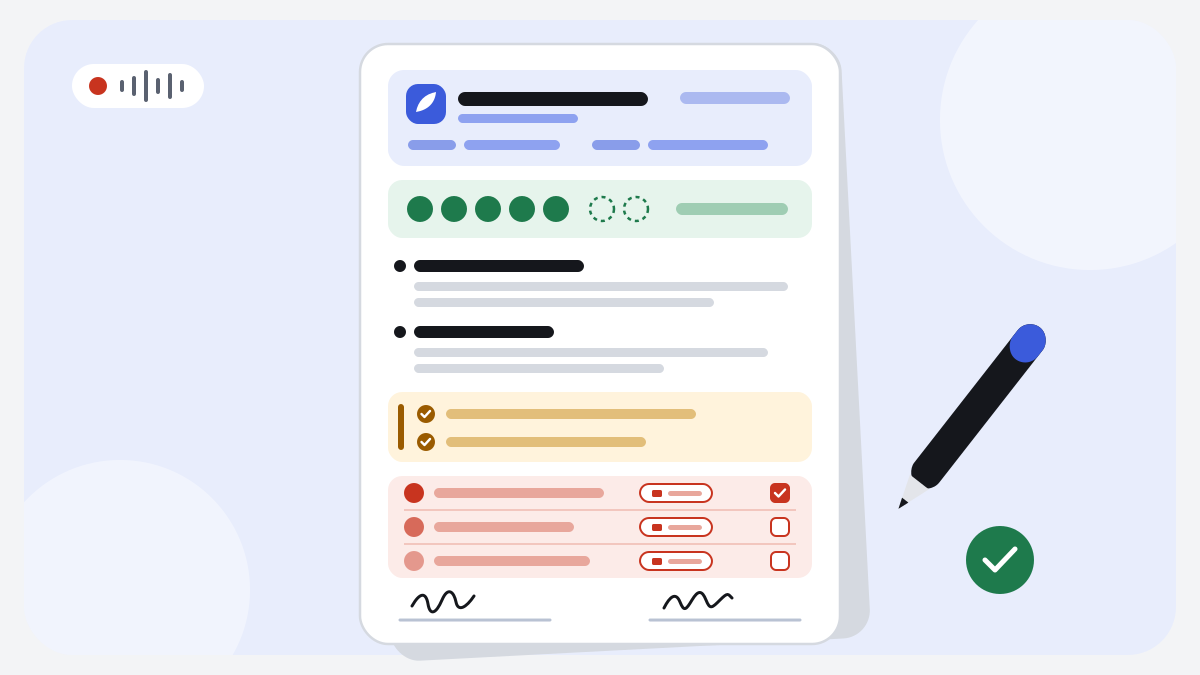
In the illustration, each colour is one part of the template: blue is the header, green is attendance (filled circles are people present, dashed circles are apologies), the grey lines are agenda items with a short discussion, yellow holds the decisions, the red table lists actions with an owner, a due date and a checkbox, and the two lines at the bottom are the signatures.
A useful rule for the discussion part comes from Robert's Rules of Order, which many associations follow: minutes are a record of what was done at a meeting, not a record of what was said. Even if your meeting is informal, writing down outcomes instead of conversations keeps minutes short and readable.
Template 1: formal minutes (board, committee, association)
Use this when minutes are approved at the next meeting and may be read by auditors, members or regulators. Copy the block, replace the brackets, and delete what your meeting does not use.
[Organisation name] Minutes of the [meeting name], No. [ ]
- Date: [ ]
- Time: [start] to [end]
- Place: [room, address or call link]
- Chair: [name]
- Minute-taker: [name]
- Present: [names]
- Apologies: [names]
- Absent: [names]
- In attendance (not members): [names and roles]
- Quorum: [reached / not reached]
- Opening. The chair opened the meeting at [time] and welcomed [guests].
- Approval of the previous minutes. The minutes of [date] were approved [as circulated / with these corrections: ].
- Matters arising. [Item from the previous minutes]: [update, and who reported it].
- Reports. [Report name]: [two or three key points].
- Items for decision.
- 5.1 [Topic]. Proposal: [exact wording]. Proposed by [ ], seconded by [ ]. Result: [carried / not carried, with the vote count if votes were counted].
- 5.2 [Topic]. [ ]
- Any other business. [ ]
- Next meeting. [Date, time, place].
- Close. The chair closed the meeting at [time].
| No. | Action | Owner | Due date |
|---|---|---|---|
| 1 | [ ] | [ ] | [ ] |
| 2 | [ ] | [ ] | [ ] |
Signed: Chair [name, date] · Minute-taker [name, date]
Template 2: team or weekly meeting
Most weekly meetings do not need motions or signatures. They need to show what changed, what was decided and who does what next. This version fits on one screen.
- Meeting: [Team] weekly check-in
- Date and time: [ ]
- Attendees: [names]
- Notes by: [name]
- Goal of this meeting: [one line]
Updates
- [Project or person]: [one line on progress or blockers]
Decisions
- [What was decided, in one sentence]
Action items
| Action | Owner | Due | Status |
|---|---|---|---|
| [ ] | [ ] | [ ] | Open |
Parked for later: [topics that came up but were not decided]
Next meeting: [date and time]
Start each weekly meeting by going through the open actions from last week's table. That one habit does more for follow-through than any amount of formatting. For how to phrase the actions themselves, see our guide to writing clear action items.
Template 3: client or partner meeting
When another organisation is in the meeting, two things change: you need to show both sides clearly, and you should agree on the minutes before treating them as final.
- Meeting: [Project] with [client name]
- Date, time, place: [ ]
- Our side: [names and roles]
- Their side: [names and roles]
- Purpose: [one line]
- Agreed: [each point both sides agreed to]
- Open questions: [what still needs an answer, and from whom]
- Actions for us: [task, owner, due date]
- Actions for them: [task, owner, due date]
- Documents shared or promised: [ ]
- Next contact: [date and form]
Send these to the client with a short note such as "Here is our summary; please let us know by Friday if anything is missing." That gives both sides a chance to correct misunderstandings while the meeting is still fresh.
A filled example: weekly planning meeting
Here is Template 2 filled in for a small events team. The names are made up; the structure is what matters.
- Meeting: Events team weekly planning
- Date and time: Tuesday 12 May, 09:30 to 10:00
- Attendees: Dana (chair), Luis, Mei, Tom
- Notes by: Mei
- Goal of this meeting: agree on how to raise sign-ups for the June workshop
Updates
- Venue: contract signed and deposit paid.
- Registrations: the page is live; sign-ups are below the target the team set.
- Catering: two quotes received, one with a full vegetarian menu.
Decisions
- Send a reminder email to last year's attendees instead of paying for ads.
- Book the caterer with the vegetarian menu.
Action items
| Action | Owner | Due | Status |
|---|---|---|---|
| Write and send the reminder email to past attendees | Tom | Thu 14 May | Open |
| Confirm catering numbers and dietary needs | Luis | Mon 1 June | Open |
| Post registration numbers in the team channel | Mei | Every Friday until the event | Open |
Parked for later: whether to record the workshop sessions. The speakers need to be asked first; our article on recording meetings with consent covers how to ask.
Next meeting: Tuesday 19 May, 09:30
Notice what is not there: no record of who argued for ads, no long paragraphs, no "we discussed catering." A reader who missed the meeting knows in thirty seconds what happened and what they need to do.
How to adapt a template to your meeting
- Delete headings you never use. An empty "Reports" section every week teaches people to skim past headings.
- Keep the order fixed. When decisions are always in the same place, readers find them without searching.
- Put decisions first for busy readers. Some teams move "Decisions" and "Action items" to the top and the discussion below. Both work; just pick one.
- Agree on a file name. For example "2026-05-12 Events weekly minutes". Dates at the front sort correctly in any folder.
- Mark drafts. Add "DRAFT" to the title until the minutes are approved, then remove it.
- Check your own rules. Associations, boards and companies often have bylaws or a constitution that say what minutes must include, such as quorum or vote counts. Those rules come first.
If you are new to the role, our guides on how to write meeting minutes and the minute-taker's duties walk through the work before, during and after the meeting.
Common format mistakes
- Writing a transcript. Long quotes hide the decisions. Summarise the point and record the outcome.
- Decisions buried in paragraphs. If a decision sits in the middle of a discussion paragraph, nobody will find it later. Give decisions their own heading or box.
- Actions without an owner or a date. "Marketing to look into it" is a wish, not an action. Name one person and a date.
- No attendance list. Without names you cannot tell later who knew about a decision, or whether there was a quorum.
- Opinions and adjectives. "A heated discussion" or "an excellent presentation" do not belong in formal minutes. Stay neutral.
- A template that is too big. A fifteen-minute stand-up does not need eight sections. Match the template to the meeting.
- No difference between draft and approved. Readers should be able to tell which version is official.
Quick check before you send
- The header has the date, time, place and the full meeting name.
- Everyone present, absent or excused is listed.
- Every decision is written as one clear sentence.
- Every action has a task, one owner and a due date.
- Names and numbers are spelled the same way throughout.
- The file name and the draft or approved status are clear.
Fill in the template without typing it all
If you write minutes every week, Meetleaf can take care of the first draft. It records an in-person meeting on your phone, or imports a recording you already have, and you can tap an attendee's name when they start speaking so decisions and tasks are tied to the right people. You get a draft with a summary, decisions and follow-ups with an owner and a due date, using templates for general, formal, weekly team and client meetings. The Official style adds the minutes number, date, place, chair, minute-taker, numbered sections and signature lines under your organisation's letterhead, and you can export to Word or PDF. Read the draft before you send it, as you would with any minutes. See how Meetleaf works.